Prettier 1.11:CSS 修复与全新 TypeScript 特性支持

本页面由 PageTurner AI 翻译(测试版)。未经项目官方认可。 发现错误? 报告问题 →
本次发布包含大量 CSS 格式化修复以及对多项 TypeScript 新特性的支持,同时还修复了其他语言的通用错误。
自上个版本发布以来,感谢 @orta 的贡献,Prettier 官网 已全面改版焕新!
Facebook 已实现 💯% Prettier 覆盖
另一激动人心的消息是:Facebook 代码库中的所有 JavaScript 文件现已全面迁移至 Prettier!令人惊叹的是,我们并未强制推动代码库迁移——仅部署了相关工具并编写迁移指南,开发者们便自发完成了各自负责模块的转换。
在 8 个月内,75% 的代码库实现了自然迁移。上周我们发起最终冲刺完成剩余转换,并强制要求所有新文件必须使用 Prettier!这充分证明 Prettier 能稳健处理各种极端边界场景,其惊人的采用率也印证了其巨大价值。
重要更新
CSS/SCSS/Less
本次发布中,@evilebottnawi 为 CSS 格式化功能倾注了大量心血!
格式化 at 规则 (#3828 by @evilebottnawi)
此前部分 at 规则(如 @if 和 @include)未被 Prettier 格式化而保持原样输出,现在它们将获得规范格式化:
// Before:
.selector {
  @include absolute($top: $long-variable-name, $right: $long-variable-name, $left: auto, $bottom: auto);
}

// After:
.selector {
  @include absolute(
    $top: $long-variable-name,
    $right: $long-variable-name,
    $left: auto,
    $bottom: auto
  );
}
支持主流 PostCSS 插件 (#3959 by @evilebottnawi)
因 Prettier 的 CSS 格式化方式,postcss-mixins 等流行 PostCSS 插件曾无法正常工作。现在这些插件已获得兼容支持:
// Before
$theme: blue;

a {
  @mixin $(theme) -colors;
}

// After
$theme: blue;

a {
  @mixin $(theme)-colors;
}
支持 SCSS 中的 YAML 前置元数据块 (#3802 by @evilebottnawi)
Jekyll 依赖 YAML 前置元数据识别 SCSS 文件,但 Prettier 曾将其移除导致部署时网站样式异常。现在该元数据块将被保留,确保样式完整呈现:
---
title: Title
description: Description
---

a {
  color: red;
}
TypeScript
支持明确赋值断言 (!:) (#4020 by @ikatyang)
TypeScript 2.7 新增的明确赋值断言功能可用于类属性初始化器。它向 TypeScript 声明:即使类属性未初始化,我们也能确保运行时其值不为 undefined:
class MyComponent {
  ngModel!: ng.INgModelController;
}
Prettier 1.10.2 无法解析此语法:
SyntaxError: '=' expected. (2:10)
  1 | class MyComponent {
> 2 |   ngModel!: ng.INgModelController;
    |          ^
  3 | }
该功能现已在 Prettier 1.11.0 中获得支持。
支持 unique symbol (#3967 by @ikatyang)
TypeScript 2.7 还新增了 unique symbol 类型:
interface SymbolConstructor {
  readonly iterator: unique symbol;
}
Prettier 1.10.2 无法解析此语法:
SyntaxError: ';' expected. (2:29)
  1 | interface SymbolConstructor {
> 2 |   readonly iterator: unique symbol;
    |                             ^
  3 | }
  4 |
该功能现已在 Prettier 1.11.0 中获得支持。
支持条件类型 (#4006 by @Cryrivers)
TypeScript 2.8 将引入条件类型支持,其形态类似三元表达式但作用于类型位置:
export type DeepReadonly<T> =
    T extends any[] ? DeepReadonlyArray<T[number]> :
    T extends object ? DeepReadonlyObject<T> :
    T;
Prettier 1.10.2 无法解析此类语法:
SyntaxError: ';' expected. (2:7)
  1 | export type DeepReadonly<T> =
> 2 |     T extends any[] ? DeepReadonlyArray<T[number]> :
    |       ^
  3 |     T extends object ? DeepReadonlyObject<T> :
  4 |     T;
该语法现已在 Prettier 1.11.0 中获得支持。
JavaScript
修复 --use-tabs 下三元表达式缩进错误 (#3745 by @ikatyang)
由于制表符在不同环境中宽度可能不同,当使用制表符时 Prettier 有时会错误缩进三元表达式。现在我们会正确计算缩进:
// Before:
const abc = props.something
	? xyz
	: {
			prop1: a,
			prop2: b,
			prop3: false,
		};

// After:
const abc = props.something
	? xyz
	: {
			prop1: a,
			prop2: b,
			prop3: false
	  };
其他变更
CSS/SCSS/Less
优化列表嵌套的格式 (#3930 by @evilebottnawi)
此前在 SCSS 中处理嵌套列表的表现不佳,现在得到了改进。
// Before:
$space-scale: (0, "0") (0.25, "0-25") (0.5, "0-5") (0.75, "0-75") (1, "1")
  (
    1.25,
    "1-25"
  ) (1.5, "1-5") (1.75, "1-75") (2, "2") (2.25, "2-25") (2.5, "2-5")
  (
    2.75,
    "2-75"
  ) (3, "3") (3.25, "3-25") (3.5, "3-5") (3.75, "3-75") (4, "4");

// After:
$space-scale: (0, "0") (0.25, "0-25") (0.5, "0-5") (0.75, "0-75") (1, "1")
  (1.25, "1-25") (1.5, "1-5") (1.75, "1-75") (2, "2") (2.25, "2-25")
  (2.5, "2-5") (2.75, "2-75") (3, "3") (3.25, "3-25") (3.5, "3-5")
  (3.75, "3-75") (4, "4");
保留 @font-face 声明中的注释 (#3906 by @evilebottnawi)
此前若有如下代码:
@font-face {
  font-family: "Prettier";
  src: local("Prettier"), /* Local */
    url("http://prettier.com/font.woff") /* Network*/
}
Prettier 会移除 "Local" 注释:
@font-face {
  font-family: "Prettier";
  src: local("Prettier"), url("http://prettier.com/font.woff"); /* Network*/
}
现在该注释会被保留:
@font-face {
  font-family: "Prettier";
  src: local("Prettier"), /* Local */ url("http://prettier.com/font.woff"); /* Network*/
}
修复行首带括号时 CSS 的 3 空格缩进问题 (#3930 by @evilebottnawi)
当 CSS 行需要缩进且行首字符为括号时,错误地使用了 3 空格缩进而非预期的 2 空格。现已修正为 2 空格。
// Before:
$longVariable: (
   (mobile $mobile) (tablet $tablet) (desktop $desktop) (wide $wide)
);

// After:
$longVariable: (
  (mobile $mobile) (tablet $tablet) (desktop $desktop) (wide $wide)
);
修复映射对象内部的多余空格 (#3814 by @evilebottnawi)
此前 Prettier 会在 SCSS 映射对象内部错误添加空格,现已移除。
// Before:
$map: map-merge($map,  ($key: $value));

// After:
$map: map-merge($map, ($key: $value));
修复选择器列表中 SCSS 注释导致的格式问题 (#3909 by @evilebottnawi)
此前 Prettier 会错误格式化 CSS 选择器列表中的尾部 SCSS 注释,导致代码损坏:
// Before formatting:
.field {
  &[data-field-id="1"], // Name
  &[data-field-id="2"], // Email
  &[data-field-id="3"], // Postal Code
  {
    background: green;
  }
}

// After formatting (Prettier 1.10.2):
.field {
  &[data-field-id="1"],
  // Name &[data-field-id="2"],
  // Email &[data-field-id="3"] {
    background: green;
  }
}
现在 Prettier 能正确处理这些注释:
// After formatting (Prettier 1.11.0):
.field {
  &[data-field-id="1"], // Name
  &[data-field-id="2"], // Email
  &[data-field-id="3"], // Postal Code
 {
    background: green;
  }
}
修复 @import url 后多余的逗号 (#3770 by @evilebottnawi)
此前 Prettier 会在 @import url 后错误添加逗号,现已移除:
/* Before */
@import url("responsive/gt768.css"), screen and (min-width: 768px);

/* After */
@import url("responsive/gt768.css") screen and (min-width: 768px);
正确处理 !default 指令 (#3724 by @evilebottnawi)
此前 Prettier 会以奇怪方式打印 !default 指令:
$theme-checkbox-colors: (
    default: $theme-color-border,
    checked: $theme-color-checked,
    disabled: $theme-color-disabled,
    disabled-font: $theme-color-font-secondary
  )
  !default;
现已正确处理:
$theme-checkbox-colors: (
  default: $theme-color-border,
  checked: $theme-color-checked,
  disabled: $theme-color-disabled,
  disabled-font: $theme-color-font-secondary
) !default;
停止格式化 @warn 和 @error 指令内容 (#3769 by @evilebottnawi)
SCSS 支持通过 @warn 或 @error 在构建时输出文本:
// Unformatted code:
@if ($error) {
  @error 'An error occurred: (#{$error}).';
}
此前 Prettier 将这些指令误认为媒体查询,导致内容被意外格式化(例如在句点前添加空格):
// Formatted code (Prettier 1.10.2):
@if ($error) {
  @error 'error (#{$error}) .';
}
现在 Prettier 能正确处理这些指令,不再修改字符串内容:
// Formatted code (Prettier 1.11.0):
@if ($error) {
  @error "error (#{$error}).";
}
保留 Less 规则集声明的分号 (#3841 by @evilebottnawi)
此前 Prettier 会错误移除 Less 规则集声明后的分号(这些分号必须保留,否则会导致编译错误),现已保留:
// Before:
@detached-ruleset: {
  background: red;
}

// After:
@detached-ruleset: {
  background: red;
};
空 CSS 文件不再添加换行符 (#3723 by @hudochenkov)
此前 Prettier 会在 CSS 文件末尾添加换行符。考虑到 JavaScript 文件没有此行为,我们决定统一处理以避免在项目中引入 Prettier 时造成意外的版本控制变更。
忽略含 SCSS 插值的 media 参数 (#3801 by @evilebottnawi)
此前当媒体查询包含 SCSS 插值时 Prettier 会错误破坏代码,现在会保留原格式:
// Unformatted code:
$sm-only: '(min-width: 768px) and (max-width: 991px)';
$lg-and-up: '(min-width: 1200px)';

@media screen and #{$sm-only, $lg-and-up} {
    color: #000;
}

// Formatted code (Prettier 1.10.2):
@media screen and,  {
	color: #000;
}

// Formatted code (Prettier 1.11.0):
$sm-only: "(min-width: 768px) and (max-width: 991px)";
$lg-and-up: "(min-width: 1200px)";

@media screen and #{$sm-only, $lg-and-up} {
  color: #000;
}
修复选择器运算符与左括号间的双空格问题 (#3738 by @evilebottnawi)
此前当 CSS 选择器以运算符结尾(SCSS 支持的特性)时,Prettier 会错误打印多余空格,现已修复:
// Unformatted code:
.this > .ends > .with > .an > .operator > {
  // content
}

// Formatted code (Prettier 1.10.2):
.this > .ends > .with > .an > .operator >  {
  // content
}

// Formatted code (Prettier 1.11.0):
.this > .ends > .with > .an > .operator > {
  // content
}
保留 SCSS 函数名的大小写 (#3768 by @evilebottnawi)
Prettier 曾在某些情况下错误地将 SCSS 函数名转换为小写。此问题已修复。
// Unformatted code:
@include breakpoint (getBp(md)) {
  &:nth-child(2n + 3) {
    clear: both;
  }
}

// Formatted code (Prettier 1.10.2):
@include breakpoint (getbp(md)) {
  &:nth-child(2n + 3) {
    clear: both;
  }
}

// Formatted code (Prettier 1.11.0):
@include breakpoint(getBp(md)) {
  &:nth-child(2n + 3) {
    clear: both;
  }
}
保留 Vue 深度选择器 >>> 周围的空格(由 @evilebottnawi 在 #3792 中修复)
Prettier 曾错误地移除了 Vue 深度选择器周围的空格:
<!-- Unformatted code: -->
<style scoped>
  .box >>> .child-component {
    font-size: 24px;
  }
</style>

<!-- Formatted code (Prettier 1.10.2): -->
<style scoped>
  .box>>>.child-component {
    font-size: 24px;
  }
</style>

<!-- Formatted code (Prettier 1.11.0): -->
<style scoped>
.box >>> .child-component {
  font-size: 24px;
}
</style>
修复 @nest at 规则(由 @evilebottnawi 在 #3975 中修复)
Prettier 曾在传递给 @nest 的选择器中的 & 字符周围错误地添加空格,这改变了规则编译后的选择器。此问题已修复:
// Unformatted code:
.title {
  @nest :global(h1)& {
    background: red;
  }
}

// Formatted code (Prettier 1.10.2):
.title {
  @nest :global(h1) & {
    background: red;
  }
}

// Formatted code (Prettier 1.11.0):
.title {
  @nest :global(h1)& {
    background: red;
  }
}
按原样格式化 progid:DXImageTransform.Microsoft.gradient(由 @evilebottnawi 在 #4028 中修复)
在 Prettier 1.10.2 中,我们花费大量逻辑处理特定于 Microsoft 浏览器的滤镜值格式化,但效果仍不理想。由于这些语法非标准且使用频率低,我们决定直接按原样输出而不进行格式化。
不再将嵌套选择器转换为小写(由 @evilebottnawi 在 #4048 中修复)
在 Prettier 1.10.2 中,我们错误地将嵌套 SCSS 选择器转换为小写:
// Unformatted code:
.foo {
  &-1Bar {
  }
}

// Formatted code: (Prettier 1.10.2):
.foo {
  &-1bar {
  }
}
此问题已在 Prettier 1.11.0 中修复:
// Formatted code: (Prettier 1.11.0):
.foo {
  &-1Bar {
  }
}
JavaScript
不再为带注释的 return 参数添加奇怪括号(由 @duailibe 在 #3665 中修复)
当 return 语句的参数包含注释时,Prettier 曾以奇怪方式添加括号。现在这些括号的格式已优化。
// Unformatted code:
func1(function() {
  return func2
      //comment
      .bar();
});

// Formatted code (Prettier 1.10.2):
func1(function() {
  return (func2
      //comment
      .bar() );
});

// Formatted code (Prettier 1.11.0):
func1(function() {
  return (
    func2
      //comment
      .bar()
  );
});
尊重 JS 中 Markdown 的零缩进(由 @ikatyang 在 #3676 中修复)
Prettier 的 JS 中 Markdown 格式化(由名为 md 的模板标签触发)曾插入缩进:
// Unformatted code
md`
This is some markdown
`

// Formatted code (Prettier 1.10.2)
md`
  This is some markdown
`;
这对许多 Markdown 模板标签函数(如 react-markings)是可接受的理想行为,但破坏了某些内部 Markdown 格式化工具。
Prettier 1.11.0 现在会尊重你在 Markdown 中设置的缩进级别:使用类似 react-markings 模板标签的用户可继续缩进代码,而使用不支持缩进的其他模板标签的用户可选择不缩进。
像格式化 CJS require 调用一样格式化 AMD define 调用(由 @salemhilal 在 #3830 中修复)
使用 AMD 模块时,常见模式是通过 define 指定匿名模块的依赖项:
define([
  "jquery",
  "common/global.context",
  "common/log.event",
  "some_project/square",
  "some_project/rectangle",
  "some_project/triangle",
  "some_project/circle",
  "some_project/star"
], function($, Context, EventLogger, Square, Rectangle, Triangle, Circle, Star) {
  console.log("some code");
});
Prettier 1.10.2 曾将其拆分为多行,导致顶层缩进过多:
define(
  [
    "jquery",
    "common/global.context",
    "common/log.event",
    "some_project/square",
    "some_project/rectangle",
    "some_project/triangle",
    "some_project/circle",
    "some_project/star"
  ],
  function($, Context, EventLogger, Square, Rectangle, Triangle, Circle, Star) {
    console.log("some code");
  }
);
Prettier 1.11.0 现在会让数组和函数表达式"紧贴",从而减少缩进层级:
define([
  "jquery",
  "common/global.context",
  "common/log.event",
  "some_project/square",
  "some_project/rectangle",
  "some_project/triangle",
  "some_project/circle",
  "some_project/star"
], function(
  $,
  Context,
  EventLogger,
  Square,
  Rectangle,
  Triangle,
  Circle,
  Star
) {
  console.log("some code");
});
像格式化 test 一样格式化 QUnit 的 skip(由 @tmquinn 在 #3735 中修复)
Prettier 曾对 describe、it 和 test 进行特殊格式化以满足用户期望。但未对 QUnit 的 skip 方法应用相同逻辑,导致在 test 和 skip 间切换时格式不一致:
// Unformatted code
test("this is a really long description of some test I want to go here", function (assert) {
  assert("something");
});

skip("this is a really long description of some test I want to go here", function (assert) {
  assert("something");
});

// Formatted code (Prettier 1.10.2):
test("this is a really long description of some test I want to go here", function(assert) {
  assert("something");
});

skip(
  "this is a really long description of some test I want to go here",
  function(assert) {
    assert("something");
  }
);
现在我们将 skip 与 describe、it 和 test 同等对待,使 QUnit 测试格式更统一:
// Formatted code (Prettier 1.11.0):
test("this is a really long description of some test I want to go here", function(assert) {
  assert("something");
});

skip("this is a really long description of some test I want to go here", function(assert) {
  assert("something");
});
当字符串字面量属性包含换行时折行 JSX 元素(由 @duailibe 在 #4011 中修复)
根据 JSX 规范,JSX 字符串字面量内允许包含换行符,但当某个属性值为包含换行符的字符串时,Prettier 未能将该 JSX 元素识别为多行元素。现在 Prettier 将按预期将其视为多行元素:
// Unformatted code:
<path d="M4.765 16.829l3.069-2.946 5.813 5.748
  11.33-11.232 3.006 3.18-14.36 14.080z"
/>;

// Formatted code (Prettier 1.10.2):
<path d="M4.765 16.829l3.069-2.946 5.813 5.748
  11.33-11.232 3.006 3.18-14.36 14.080z" />;

// Formatted code (Prettier 1.11.0):
<path
  d="M4.765 16.829l3.069-2.946 5.813 5.748
  11.33-11.232 3.006 3.18-14.36 14.080z"
/>;
支持 flow 解析器处理 JSX 子元素展开 (#3899 by @vjeux)
在 JSX 子元素表达式容器位置使用展开运算符时,Prettier 1.10.2 在使用 flow 解析器时会引发解析错误:
<JSX>
  {...edges}
</JSX>
SyntaxError: Unexpected token ... (2:4)
  1 | <JSX>
> 2 |   {...edges}
    |    ^^^
  3 | </JSX>
在 Prettier 1.11.0 中,flow 解析器已支持此语法。
修复打印 flow 可选对象返回类型时的错误 (#3948 by @azz)
在 Prettier 1.10.2 中,以下代码会抛出错误:
function getScaledData({x}): ?{foo: number} {}
该问题已在 Prettier 1.11.0 中修复。
--insert-pragma 不再移除重复的编译指示 (#3947 by @azz)
对包含重复编译指示的代码使用 --insert-pragma 时,会移除除一个之外的所有重复项。此问题已修复:
// Unformatted code:
/**
 * @x 1
 * @x 2
 */

// Formatted code (Prettier 1.10.2):
/**
 * @format
 * @x 2
 */

// Formatted code (Prettier 1.11.0):
/**
 * @format
 * @x 1
 * @x 2
 */
为流式类型转换的三元表达式添加括号 (#3940 by @j-f1)
为提高代码清晰度,类型转换的三元表达式现在将用括号包裹:
// Unformatted code:
const foo = ((1?2:3): number);

// Formatted code (Prettier 1.10.2):
const foo = (1 ? 2 : 3: number);

// Formatted code (Prettier 1.11.0):
const foo = ((1 ? 2 : 3): number);
修复打印 DeclareExportDeclaration 时遗漏分号的情况 (#3979 by @existentialism)
在 flow 类型定义文件中,declare export default 语句的分号被错误移除的问题已修复。
TypeScript
保留 (void 0)! 的括号 (#3989 by @azz)
Prettier 曾错误地移除 (void 0)! 的括号,导致程序 AST 被改变。此问题已修复。
正确处理包含 TSNonNullExpression 的链式调用 (#4005 by @ericanderson)
当链式调用包含 TypeScript ! 非空断言表达式时,Prettier 未能应用链式格式化风格。此问题已修复:
// Unformatted code:
this.tokenLoads.get(locator).get(start).push({});

this.tokenLoads.get(locator)!.get(start).push({});

// Formatted code (Prettier 1.10.2):
this.tokenLoads
  .get(locator)
  .get(start)
  .push({});

this.tokenLoads.get(locator)!.get(start).push({});

// Formatted code (Prettier 1.11.0):
this.tokenLoads
  .get(locator)
  .get(start)
  .push({});

this.tokenLoads
  .get(locator)!
  .get(start)
  .push({});
Markdown
列表项后的标题被错误合并到列表中 (#3780 by @ikatyang)
Prettier 曾将列表下方的标题错误地合并到列表中。现在会将其识别为标题:
<!-- Unformatted code -->
* Something
### Some heading

<!-- Formatted code (Prettier 1.10.2) -->
* Something
  ### Some heading

<!-- Formatted code (Prettier 1.11.0) -->
* Something

### Some heading
不再解析链接 URL 中的 HTML 实体 (#3780 by @ikatyang)
包含 HTML 实体的链接 URL 在 Prettier 处理时会被错误修改的问题已修复,现在保留原格式。
<!-- Unformatted code -->
[Test](http://localhost:8080/test?language=DE¤cy=EUR)
<!-- Formatted code (Prettier 1.10.2) -->
[Test](http://localhost:8080/test?language=DE¤cy=EUR)
<!-- Formatted code (Prettier 1.11.0) -->
[Test](http://localhost:8080/test?language=DE¤cy=EUR)
修复代码块内模板字符串的缩进问题 (#3676 by @ikatyang)
Markdown 代码块内 JS 标签模板字符串内容的缩进计算曾存在错误:
<!-- Unformatted code: -->
- 1
  - 2
    - 3
      ```js
      something`
      asd

      asd

      asd
      `
      ```

<!-- Formatted code (Prettier 1.10.2): -->
* 1

  * 2

    * 3

      ```js
      something`
asd

asd

asd
`;
      ```
该问题已在 Prettier 1.11.0 中修复:
<!-- Formatted code (Prettier 1.11.0): -->
* 1

  * 2

    * 3

      ```js
      something`
      asd

      asd

      asd
      `;
      ```
正确打印脚注定义中的多行内容 (#3787 by @ikatyang)
Prettier 在打印包含代码块的脚注时错误使用了缩进层级。此问题已修复:
<!-- Unformatted code: -->
Some text.[^fn]

[^fn]: Here is a footnote which includes code.

    ```rs
    fn main() {
        println!("this is some Rust!");
    }
    ```

<!-- Formatted code (Prettier 1.10.2): -->
Some text.[^fn]

[^fn]: Here is a footnote which includes code.

```rs
fn main() {
    println!("this is some Rust!");
}
```

<!-- Formatted code (Prettier 1.11.0): -->

Some text.[^fn]

[^fn]: Here is a footnote which includes code.

```rs
fn main() {
    println!("this is some Rust!");
}
```
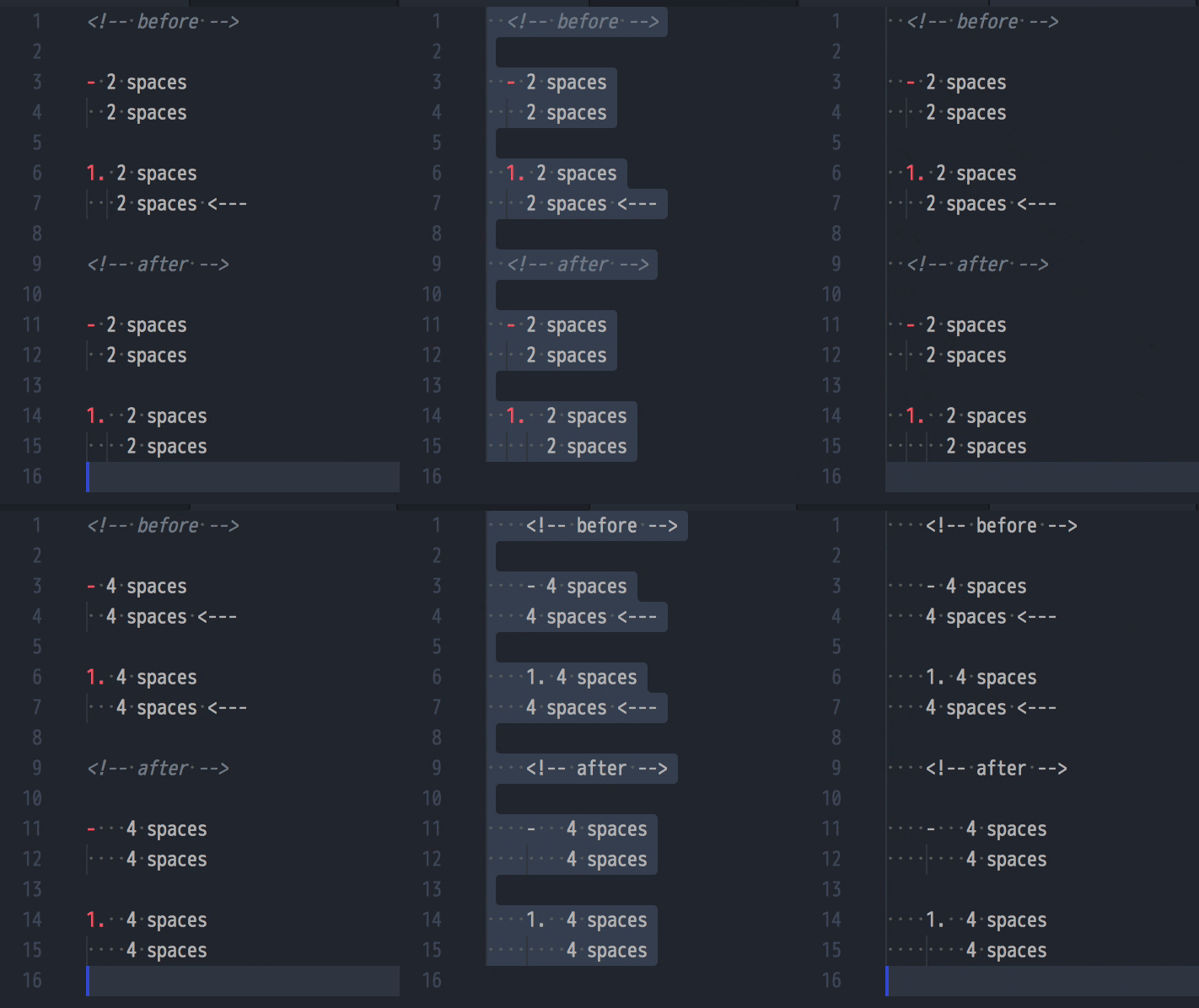
为列表项应用 tabWidth 设置 (#3990 by @ikatyang)
我们发现 CommonMark 在列表项代码块处理上与原始 Markdown 语法存在差异,这导致缩进代码块在 Markdown 中被渲染为普通段落。本次变更使用 tabWidth 选项确定列表项的缩进量。详情可参考 #3459。
<!-- before -->
1. Change to your home directory:

   cd

<!-- after -->
1. Change to your home directory:

        cd
此项改进还将优化文本编辑器中的缩进表现:
API
支持插件中的选项配置 (#3775 by @ikatyang)
作为社区语言插件测试版 API 的完善工作,我们新增了插件自定义选项的支持!
插件选项现在可以显示在帮助信息中:
prettier --plugin @prettier/plugin-python --help
同样地,插件选项也可以在命令行中指定:
prettier --plugin my-cool-prettier-plugin --my-custom-option
插件选项还可以在 .prettierrc 配置文件中定义:
{ "plugins": ["foo-plugin"], "fooOption": "bar" }
禁止在配置文件中使用短横线命名选项 (#3622 by @ikatyang)
此前 Prettier 错误地允许在 .prettierrc 文件中使用短横线命名的选项变体:
{ "print-width": 100 }
这并非设计允许的行为,现已被撤销(此类情况需改用 printWidth)。
配置
传递 --config 时仍遵循 EditorConfig 配置 (#3992 by @josephfrazier)
此改动优化了 .editorconfig 文件处理逻辑。此前当指定 --config 参数时,系统会忽略 .editorconfig 文件。
感谢所有 Prettier 贡献者及社区成员,正是你们让 Prettier 成为成功且高效的开源项目!没有大家的付出 ❤️ 我们无法达成今日成就!